
Subscriber Payment Updates
How your subscribers manage and update payments in their portal
Secure Card Capture
Secure Card Capture lets your Shopify subscribers add and manage the card on file for their Scheduled Orders right inside the Subscriber Portal — no redirect to an external page.
Shopify subscriptions only.On WooCommerce, subscribers continue with your current gateway card flow.
What you get
- In-portal capture — subscribers add and update their card without leaving the portal.
- PCI offloaded — card data is tokenized into a PCI-compliant vault; neither your store nor QPilot stores the raw number.
- Card health monitoring — reissued, closed, or invalid cards are flagged before they fail at the next charge.
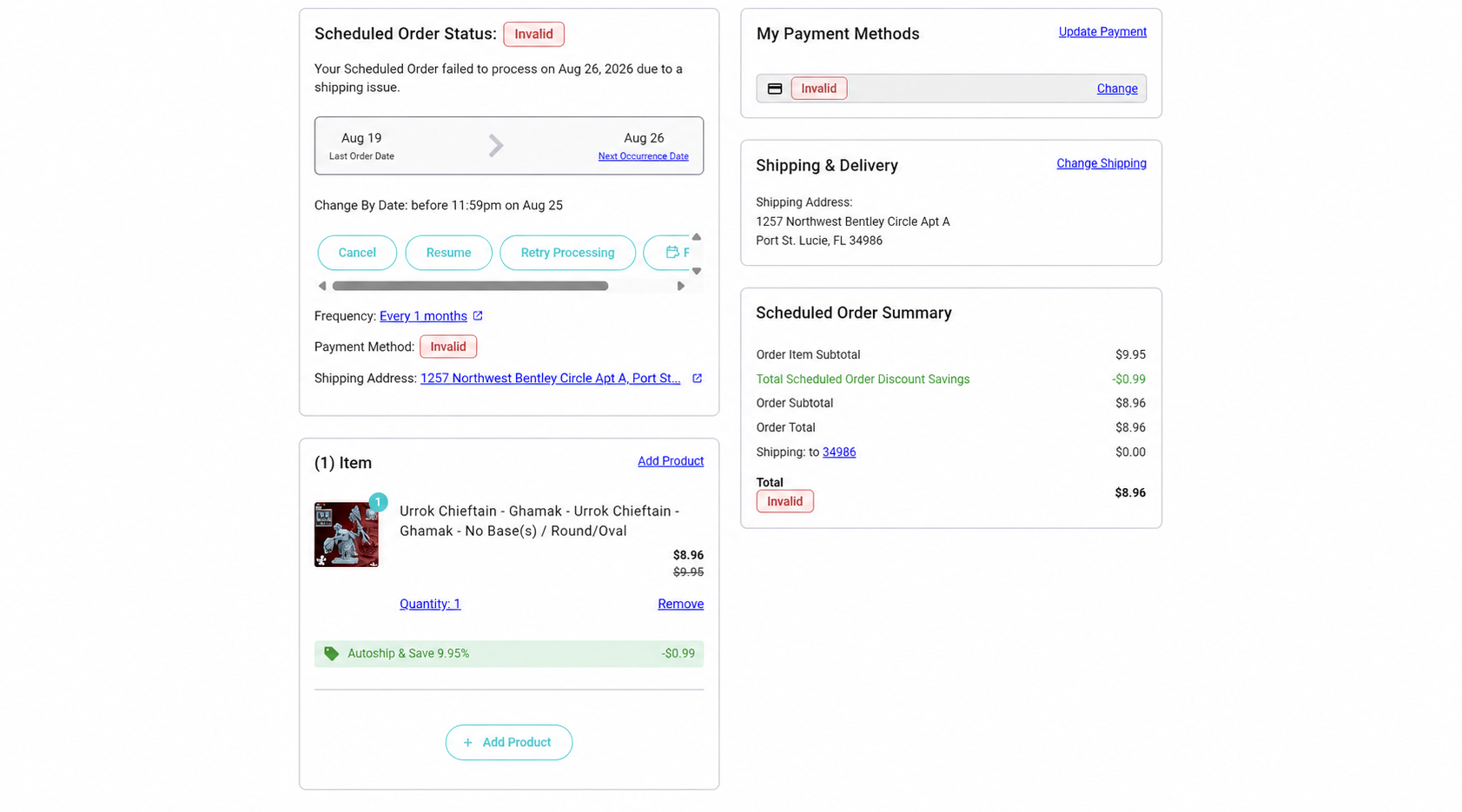
- At-a-glance status — the card's status (e.g. Invalid) shows everywhere it's referenced in the portal.
- Full lifecycle — add, edit, and remove cards in one place.
Table of Contents
- Availability and prerequisites
- What your subscribers experience
- Adding a card
- Editing a card
- Removing a card
- Card health monitoring and statuses
- What Secure Card Capture covers
- FAQ
- What's next
Availability and prerequisites
Secure Card Capture is turned on by the QPilot team — it's not self-serve yet, so reach out to your QPilot contact to enable it.
Before it can be turned on, your store needs:
- Autoship for Shopify, live — installed and launched, with subscriptions running.
- The Subscriber Portal displayed — so subscribers have a place to manage their card.
Once enabled, the secure card field appears automatically in the portal's payment flow — nothing for subscribers to install or set up.
Not enabled yet?The portal falls back to your standard payment-update page — nothing breaks, the inline card field just isn't shown.
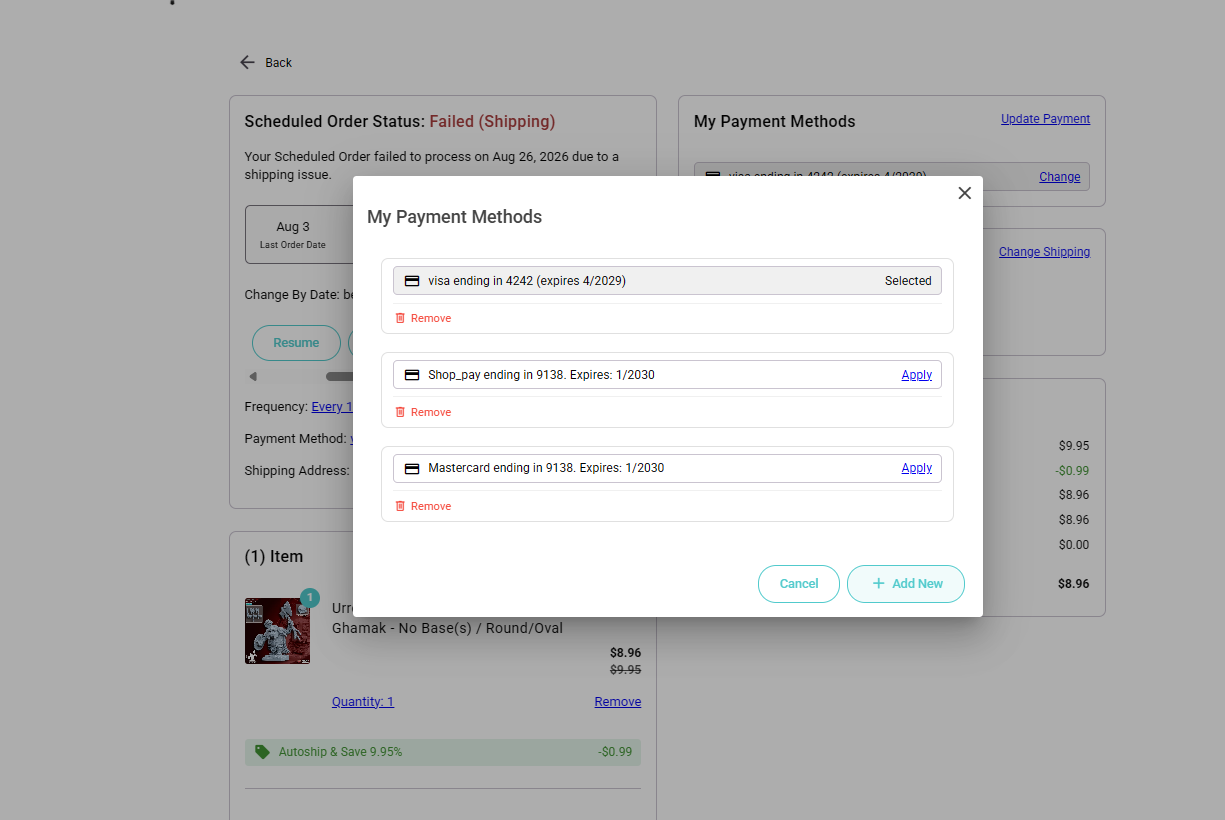
What your subscribers experience
From the subscriber's point of view, managing a card is a single, contained flow inside the portal:
- They open Change Payment Method (or Add New) from their payment methods.
- A secure card field loads directly in the portal.
- They enter their card details and billing information and submit.
- A short "securing your card" splash confirms the card is being saved, then a success state.
- The new card appears in their payment methods, ready for their Scheduled Orders.
The card field is a secure, embedded component — the subscriber never leaves the portal, and the card number is encrypted in place as they type it.
Why this matters for retention. Every redirect to an external page is a place a subscriber can drop off. Keeping card capture inside the portal removes that friction — especially valuable when a subscriber is updating a card to keep a subscription active.
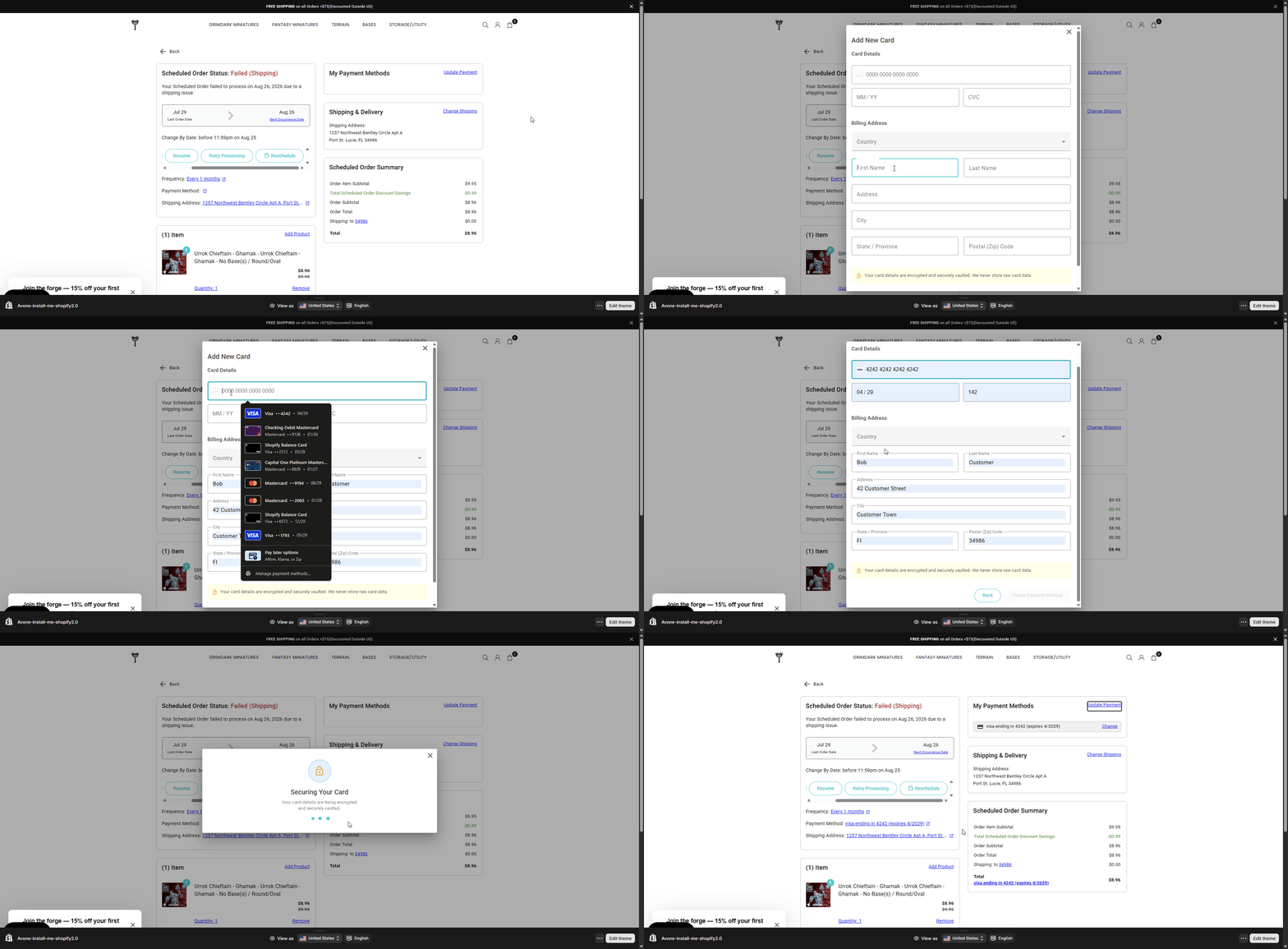
Adding a card
When a subscriber adds a new card:
- The secure card field validates the card number, expiry, and security code as they type.
- Billing details are validated alongside the card.
- On submit, the subscriber sees a brief securing state while the card is saved, followed by a success confirmation.
- The new card is now available to assign to their Scheduled Orders.
If the card can't be saved — for example, the card is declined — the subscriber sees a clear declined state with the option to Try Again or Use a Different Card, without losing their place in the flow.
The success confirmation requires a tap. The new card is only reflected back in the subscriber's payment list after they acknowledge the success screen (for example, by tapping Continue). If a subscriber closes the dialog before confirming, they may need to reopen it to see the newly added card. We call this out so your support team isn't surprised by a "I added my card but don't see it" question.
Removing a card
Subscribers can remove a card they no longer want on file. Removal:
- Asks the subscriber to confirm before anything is deleted.
- Shows a short progress animation while the card is removed.
- Confirms once the card has been removed.
If a removal can't be completed, the subscriber is shown a clear error with the option to retry.
A card tied to an active Scheduled Order can't be silently removed. If a card is the payment method for an active Scheduled Order, removing it requires reassigning that order to another card first. This protects subscribers from accidentally leaving a Scheduled Order with no way to pay.
Card health monitoring and statuses
This is where Secure Card Capture earns its keep against involuntary churn. Every card captured this way is automatically monitored. When the subscriber's bank changes the card's state, QPilot updates the card's status so the problem is visible before it causes a failed order.
What gets surfaced today:
- Card closed or invalidated — if the bank closes the account or flags the card (reported lost, fraud, and so on), the card is marked Invalid. That status shows up on the payment method across the portal — on the order detail, the Scheduled Order summary, and the Scheduled Order details — so it's visible wherever the card is referenced.
- Card reissued / replaced — when a bank issues a replacement card (same account, new number), QPilot records the replacement against the card's history.
What monitoring does and doesn't do. Card monitoring surfaces card problems — it flags an invalid or closed card so you and the subscriber can act. When a card is reissued, the subscriber confirms the updated card. The value is early visibility: you find out a card is dead from a status badge, not from a declined charge.
What Secure Card Capture covers
- Secure, PCI-offloaded card capture in the Subscriber Portal for Shopify subscriptions.
- Add, edit, and remove cards inside the portal.
- Automatic monitoring that flags closed or invalid cards and records reissued cards.
- Card status surfaced across the portal (payment methods, order detail, Scheduled Order summary and details).
FAQ
Is my subscribers' card data stored on my store or by QPilot?
No. The card number is captured in a secure field and held in a dedicated PCI-compliant vault. Your store and QPilot work with a token, not the raw card. This keeps your PCI compliance footprint minimal.
Do my subscribers need to do anything to set this up?
No. Once Secure Card Capture is enabled for your store, the secure card field appears in the portal automatically. There's nothing for the subscriber to install.
Does this work for WooCommerce?
Not today. Secure Card Capture is currently offered for Shopify subscriptions. WooCommerce stores continue using their existing gateway card flows.
What happens to cards my subscribers already have on file?
Existing cards continue to work as they do now. Secure Card Capture applies to cards added or updated through the new secure flow.
A subscriber says they added a card but don't see it — what happened?
The newly added card appears once the subscriber acknowledges the success screen. If they closed the dialog early, ask them to reopen their payment methods; the card will be there.
What happens when a subscriber's card is reissued or replaced?
QPilot flags the card so it can be updated, and the subscriber confirms the new card. You're notified through the card's status rather than finding out at a declined charge.
Updated 2 months ago